I have updated Anthias via ./bin/run_upgrade.sh. But in the menu bar at the top it still says “Udate Abailable”. Is the text always there?
The installed version is just master@78fff70
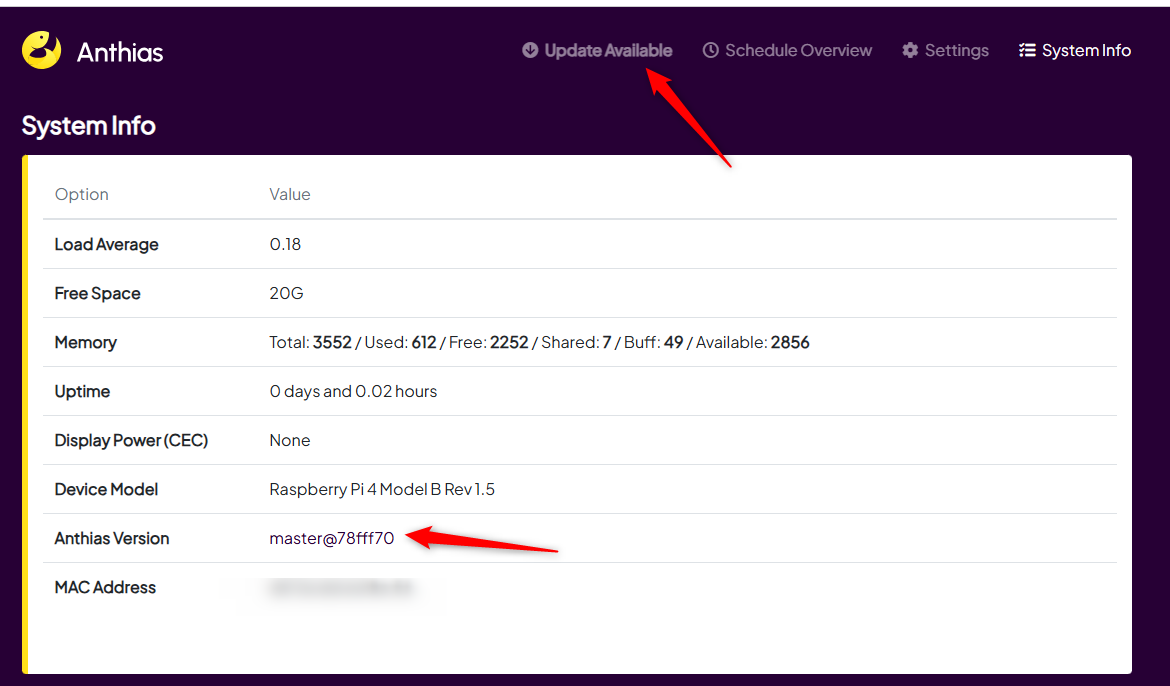

@LHBL2003, let me take a closer look. This might have caused by a new Git commit was (that doesn’t trigger Docker image builds and pushes) pushed to master.
@LHBL2003, new commits have already been pushed. If you wish to update Anthias, you could check if the “Update Available” menu is gone. The latest version at the moment is master@5d44ac8.

Same here.
I have run ./bin/run_upgrade.sh twice in response to the message “updates available” in header bar. But the version stays at master@8563c08
It is irritating - because I do not know whether the system is up to date or not.
Is there any resolution to this - either a fix or a workaround?
@alianmac, have you tried running the upgrade script again? There’s a new commit made yesterday.
Would removing the Update Available feature help?
@nicomiguelino I got there slightly ahead of you. 
I ran the update several times earlier today and noticed that the string after master@ changed but updates were still available.
Eventually, I got to master@09f8c87 and the “updates available” disappeared. The messages in the SSH session said:
Total reclaimed space: 3.71GB
Reading package lists… Done
Building dependency tree… Done
Reading state information… Done
0 upgraded, 0 newly installed, 0 to remove and 0 not upgraded.
Reading package lists… Done
Building dependency tree… Done
Reading state information… Done
0 upgraded, 0 newly installed, 1 reinstalled, 0 to remove and 0 not upgraded.
Need to get 125 kB of archives.
After this operation, 0 B of additional disk space will be used.
Get:1 Index of /debian bullseye/main armhf plymouth armhf 0.9.5-3+rpt2 [125 kB]
Fetched 125 kB in 0s (774 kB/s)
(Reading database … 46710 files and directories currently installed.)
Preparing to unpack …/plymouth_0.9.5-3+rpt2_armhf.deb …
Unpacking plymouth (0.9.5-3+rpt2) over (0.9.5-3+rpt2) …
Setting up plymouth (0.9.5-3+rpt2) …
update-initramfs: deferring update (trigger activated)
Processing triggers for man-db (2.9.4-2) …
Processing triggers for initramfs-tools (0.140) …
And I inferred that master@09f8c87 is the current version. I hope that I am right
I think that “update available” is useful. What would be helpful is to know the “master@” code for the latest version and also, on the update advice block to have it explained that running the update script initiates an incremental update rather than updating to the the current version in a single pass.
On a slower board (Raspberry Pi 3 Model B V1.2 in my case), running an update is in the “take a break for a coffee and then maybe walk around the block while it finishes” category. So, running updates several times needs planning - particularly if the display fulfills an operational requirement.
@alianmac, I’ll keep that in mind. Thanks.
This is fixed. The old version decided whether an update was available by comparing your device’s exact build against the very latest code, so it would keep showing “Update available” even right after you had updated. That check was reworked in #2831 (shipped in v2026.05.0): it now compares your installed release against the latest published release, and it does not show the banner at all on development or branch builds. So on a current release the banner clears once you are up to date. Marking this as solved.